The to-do app you share with your AI.
Speak it on your iPhone, think it through with Claude, and Kern keeps it moving in between. For iPhone and Mac.
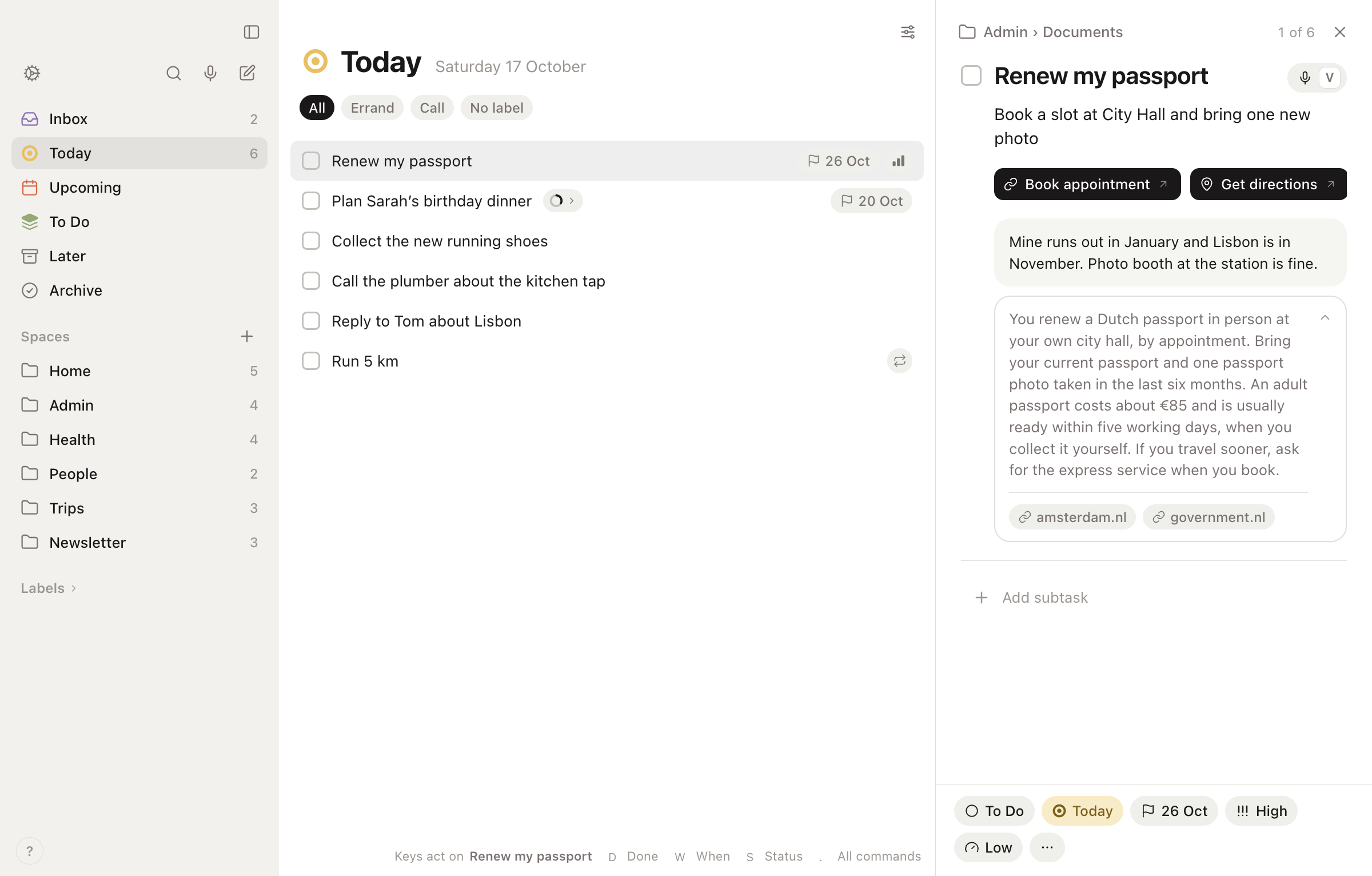


Your thinking already happens in your AI. Your to-dos belong where it can reach them. Kern is the to-do app built for that: one place where you and your AI work together.
Claude works right inside your to-dos.
Connect Kern to Claude once, and Claude can read and change every task: plan your week, split a project into steps, file what Kern wasn’t sure about. Your AI already knows you, so Kern doesn’t have to.

Done. Plan Sarah’s birthday dinner is in Today, under People › Birthdays, due 20 October, with three steps: ask who’s coming, book a table for six, order the cake.

Ask Claude on every task
One tap opens Claude with the task, ready to talk it through.
Chat or app, as it suits you
Think it through with Claude, tick it off in Kern.
The context stays with the task
Claude writes what you worked out into the task’s notes.
Skip the taps. Just say it.
Adding a task usually means finding the field, opening the picker, choosing the day, then moving the reminder too. In Kern you say it: “Renew my passport before Friday, and remind me at nine.” Changing it later works the same way, on your iPhone and your Mac. Kern AI fills in the rest, with Undo if it got it wrong.


From wherever you are
The + button, the Action Button, the Lock Screen, or the menu bar on your Mac.
Change it the same way
Dates, reminders, notes, labels. And Undo, if it’s not what you meant.
Filed for you
A title, the right Space and section, labels and a date, from what you said.
Tasks that move themselves forward.
Under every open task, Kern AI writes the very next step, and adds up to three buttons that do it: Track package, Get directions, Open email. When it helps, it looks things up for you, with sources.


The line
The next step in one sentence, so a glance is enough.
Buttons that act
Open the page, the email or the route that gets it done.
Research with sources
What it costs, how long it takes, where to go. Before you ask.
On your Mac, add what you’re looking at.
Open Quick Entry from any app, and Kern can attach the page or email in front of you: Kern AI writes the task and adds a button that takes you back to it. Or hold the menu bar icon and say it. Your Mac and your iPhone are one list.


Quick Entry
Over any app, and gone again when you’re done.
What you’re looking at
Attach the page or email in front. Nothing leaves your Mac until you do.
Speak from the menu bar
Hold the icon, say the task, let go.
One list, everywhere
Add it on the Mac, tick it off on the iPhone. Works offline on both.
Structure for the rest of your life.
Work has its project tools. Your own projects deserve the same: room for context, steps that depend on each other, and reminders you can trust. Kern has the structure, without the overhead.
Spaces and sections
Home, Health, Trips: each part of life with its own sections.
Subtasks
Break a task into steps, with a ring that fills as you go.
Repeats
Every Monday, every other week, the first of the month.
Reminders that move
Move a task to Friday and its reminder moves with it.
Deadlines
When it’s due, apart from the day you plan to do it.
Blocking and related
Mark what waits on what, and link tasks that belong together.
Today, Upcoming, Later
What’s now, what’s next, and what can wait without nagging.
One box for everything
On the Mac, find any task, list or command from one place.
Open about where your tasks go.
Kern stands on a few companies you probably know. Here is exactly who does what with your tasks, and where. Your tasks are never sold and never used for ads.
| Company | What it does for Kern | Where |
|---|---|---|
| Supabase | Stores your tasks and keeps your devices in sync | Ireland, EU |
| Anthropic | Runs Kern AI: filing, the line, buttons, voice edits, and reading a window on the Mac | United States |
| OpenAI | Turns what you say into text | United States |
| Sentry | Crash reports, not linked to your account | Germany, EU |
| PostHog | Counts of what’s used in the apps, without your tasks | Germany, EU |
| Vercel | Serves this website | Worldwide |
Works offline
Every device keeps its own copy and syncs when it’s back online.
Yours to take, or delete
Export My Data gives you one file with everything. Delete Account removes it from Kern’s server.
Window pictures aren’t kept
On the Mac, Kern never keeps the picture of a window you attach.
No ads, no tracking
Nothing is sold. This website sets no cookies and only counts visits, without knowing who you are.
Kern for iPhone and Mac.
Set up with Claude in 3 minutes.